Gifts for Every Memory Maker
Every photo, every video, every memory, kept safe for years to come.


For the Student
Dorm life, game days, road trips and graduation selfies: these are the years they’ll want to remember forever. Picture Keeper MAX backs up photos, videos and contacts from phones, tablets and computers, so their memories and files are safe even if their phone isn’t. The black keychain case clips right onto their keys or backpack, making it the gift they’ll carry everywhere.
Included: (1) Picture Keeper MAX 64GB Gold + (1) Picture Keeper Keychain Case Black
Backup Your Photos in 3 Easy Steps!

Step 1
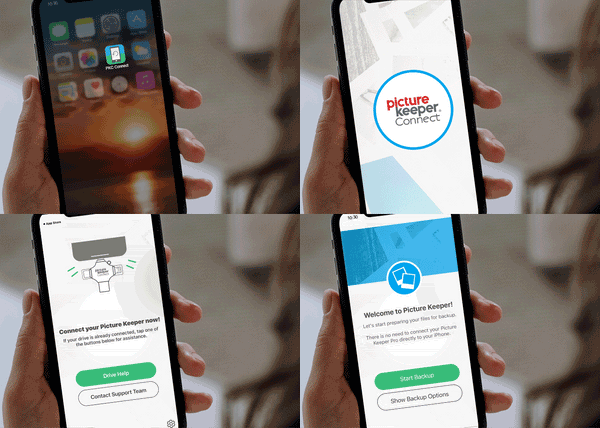
For Mobile & Tablet Users: Download the Picture Keeper app from the App Store or Google Play store. Then connect your Picture Keeper to your device.
For Computer Users: Simply connect your Picture Keeper to a USB port—no additional downloads required!
Step 2
For Mobile & Tablet Users: Launch the Picture Keeper app you just downloaded.
For Computer Users: Open the drive that appears on your computer and double-click the Picture Keeper application to get started.

Step 3
No matter which device you’re using, just click Start Backup and let Picture Keeper do the rest! The process is quick, effortless, and securely saves your photos without any hassle. In just moments, your cherished memories are safely backed up and ready whenever you need them.